MILAN BAROT

Building Data Systems
That Are Fast & Reliable.
Senior Data Engineer with 6+ years of experience building and optimizing data pipelines, reporting systems, and ETL solutions across healthcare, real estate, and telecom. My core expertise is healthcare data engineering, with hands-on experience across payer and TPA environments, HealthRules Payer, claims and eligibility data, SQL Server, Azure, and legacy-to-modern platform migrations. I specialize in translating complex business requirements into reliable, production-ready data solutions, with a growing focus on Apache Spark, Databricks, and modern lakehouse architectures.
Data Engineering
Healthcare ETL, SQL optimization, data pipelines, reporting systems, and legacy-to-modern platform migration across payer and TPA environments.
Modern Data Platforms
Apache Spark, PySpark, Databricks, Delta Lake, and lakehouse architectures, with hands-on projects extending traditional data engineering into modern platforms.
Technical Expertise
Specialized in scalable data engineering, cloud infrastructure, and AI-powered production systems.
Languages
- Python (Data / AI)
- SQL (Databricks / Postgres)
- JavaScript (Node.js)
- Bash / Shell
Cloud & Infra
- Azure Databricks / ADF
- AWS S3 / Lambda
- Docker
- GitHub Actions / CI-CD
AI & Pipelines
- LLM / RAG Pipelines
- Apache Airflow
- Dagster
- Pyspark / Pandas
Portfolio Showcase
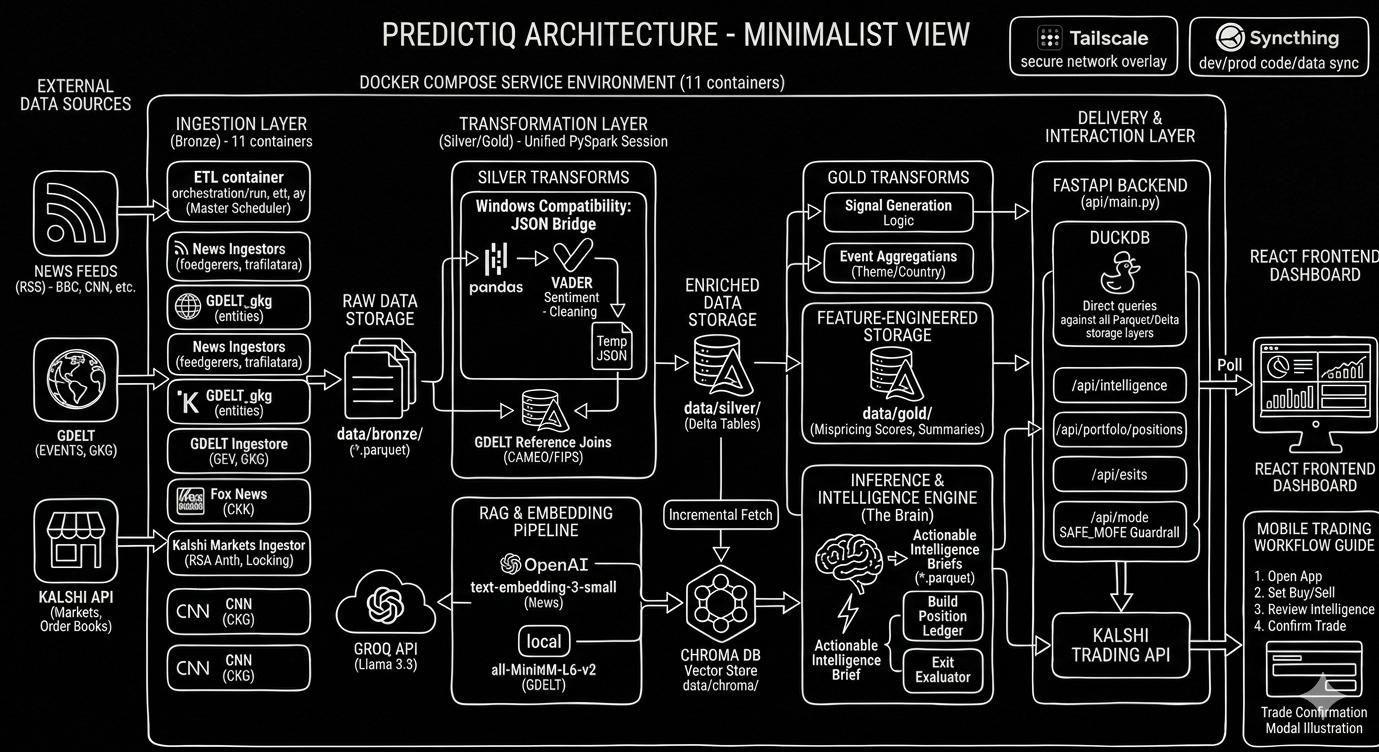
Kalshi Custom Predictions
Real-time data engineering pipeline identifying mispriced contracts on the Kalshi prediction market. Ingests live RSS feeds and GDELT events through a Medallion architecture (Bronze → Silver → Gold), indexes news via ChromaDB RAG, and issues Buy/Sell signals using Groq's Llama 3.3 with Kelly Criterion position sizing.
- PySpark / Pandas
- DuckDB / Delta Lake
- ChromaDB / Groq LLM
- Docker / FastAPI
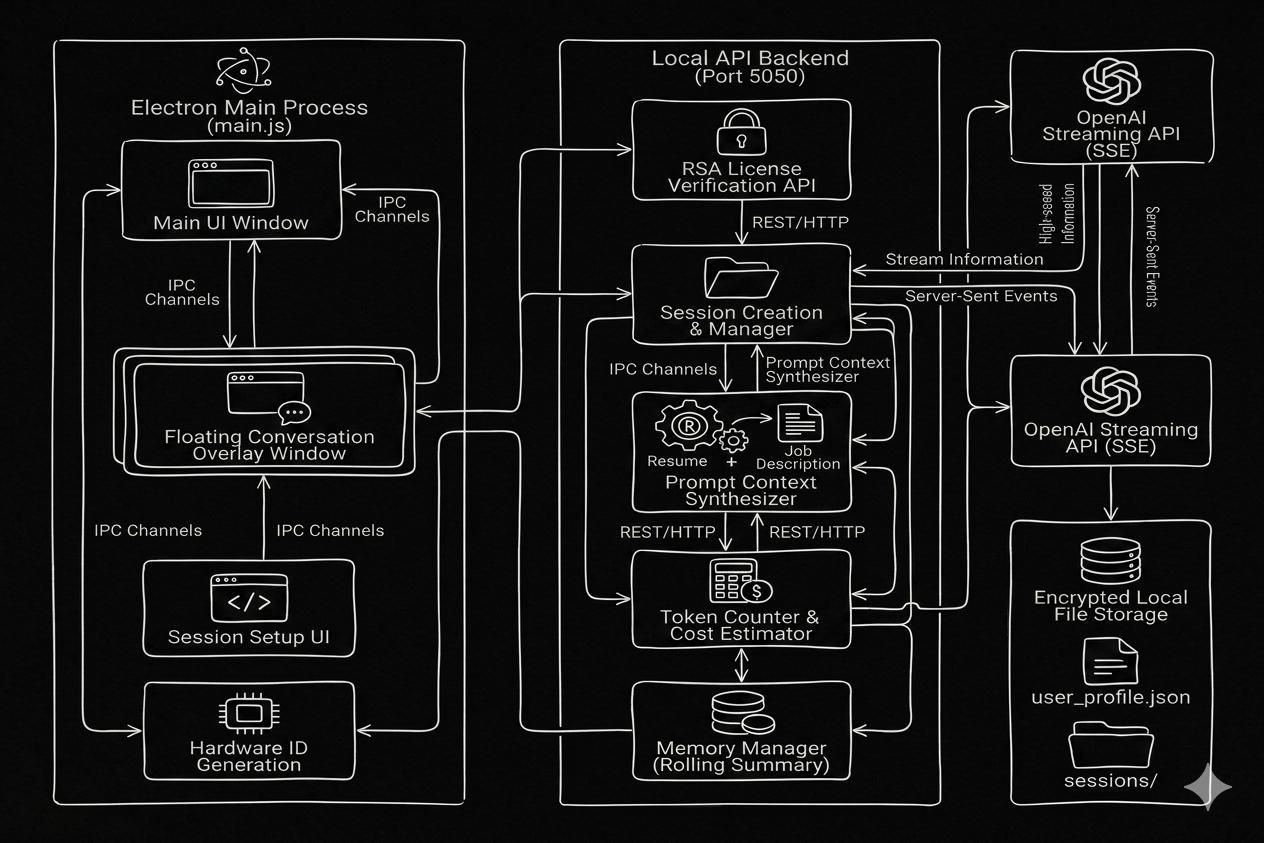
RealTime Context Engine
Real-time AI co-pilot for technical interviews. Pairs an Electron shell with a FastAPI backend to ingest live screen + audio, inject resume context via a custom RAG pipeline, and stream grounded answers with sub-second latency.
- Python / FastAPI
- Electron / Node.js
- OpenAI GPT / SSE
- RSA / PyInstaller
SmartScreen may prompt you — this app uses a local developer certificate. If Windows flags it, click More info → Run anyway to proceed.
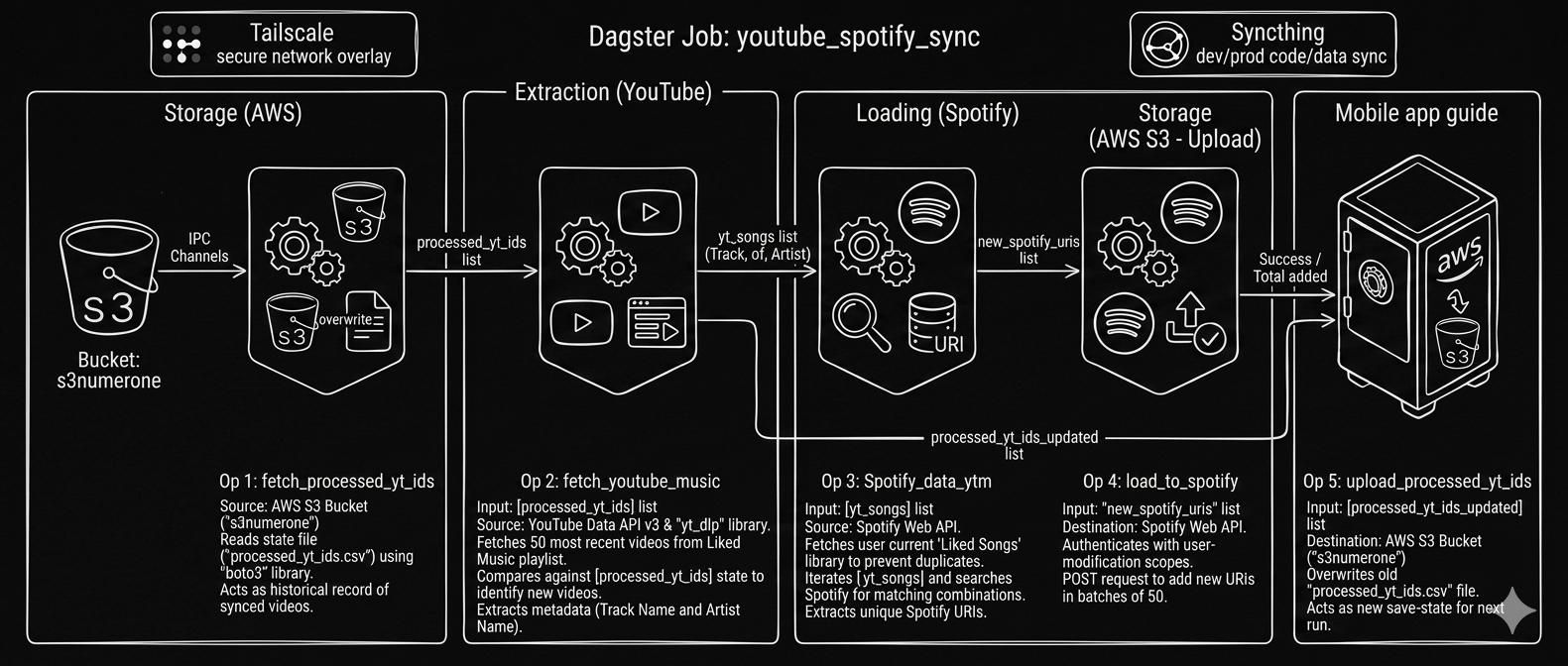
Cross-Platform Music Sync
Automated ELT pipeline keeping YouTube Music and Spotify libraries in sync. Persists state to S3 to prevent duplicates; runs monthly via Dagster.
- Python / Pandas
- Dagster
- AWS S3 / PostgreSQL
- OAuth 2.0 / REST
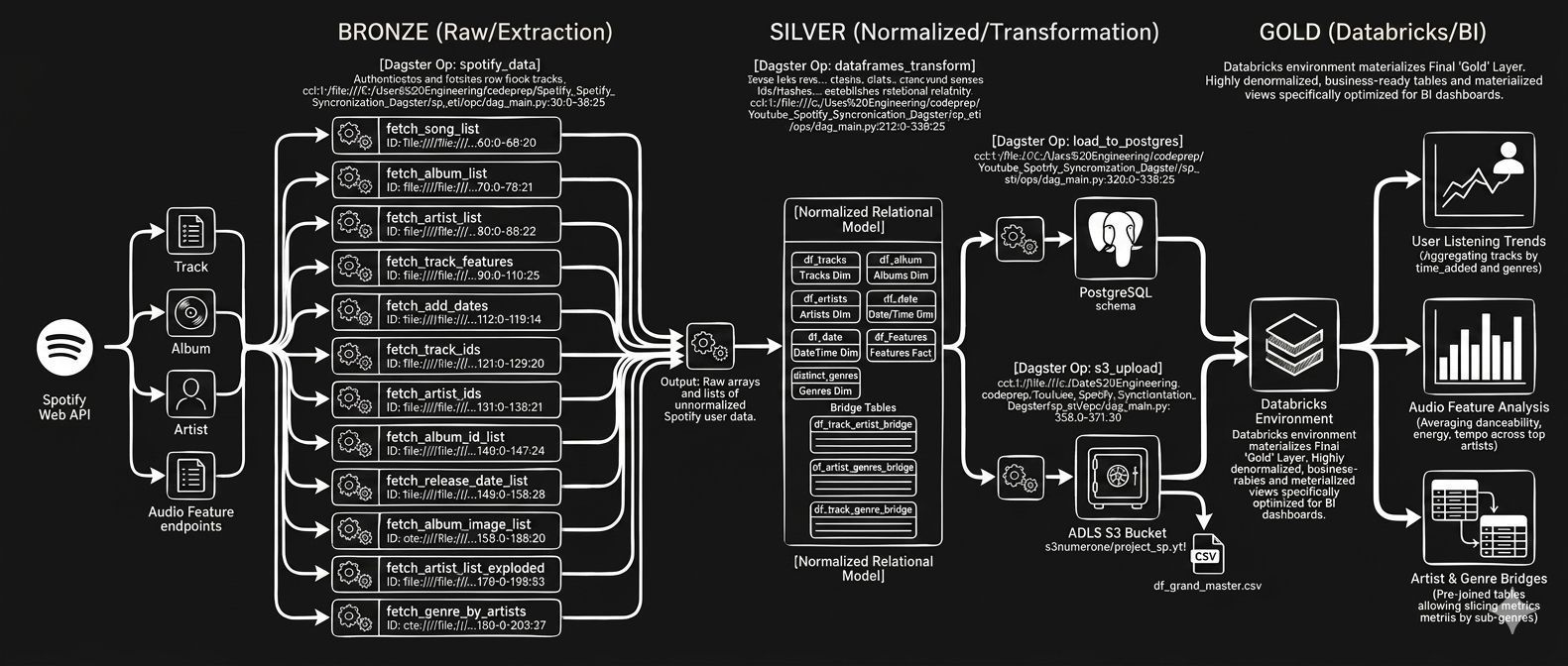
Spotify Liked Songs Analytics
Analytics pipeline surfacing listening patterns from Spotify audio features. Staged to PostgreSQL, transformed with Pandas, visualized in Power BI dashboards, and orchestrated with Airflow/Dagster within Docker containers.
- Python / Pandas
- PostgreSQL
- Airflow / Dagster
- Power BI / Docker
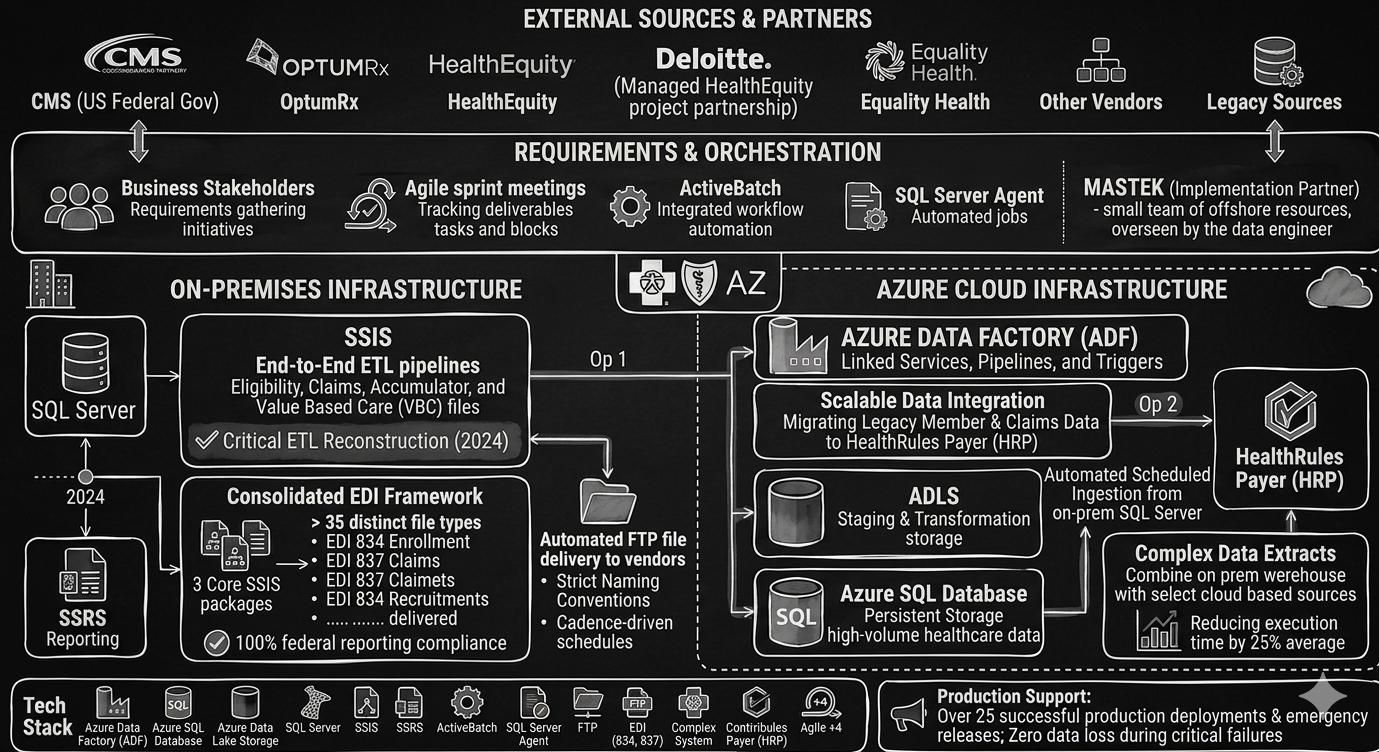
Healthcare EDI & CMS Compliance Platform
Architected a consolidated EDI 834/837 framework at BCBS Arizona, automating generation and delivery of 35+ distinct CMS file types through three core SSIS packages. Orchestrated legacy payer data migration to HealthRules Payer on Azure via ADF, restored critical pipelines after the 2024 CHC system breach, and maintained 100% federal compliance across 25+ production deployments in a regulated healthcare environment.
- Azure ADF / SQL
- SSIS / SSRS
- EDI 834 / 837
- HealthRules / ActiveBatch
Let's Collaborate.
Open to technical discussions about data engineering and AI, as well as challenging collaboration opportunities.
7milan16@gmail.com